

TL;DR: Wix gets a site live fast, and that speed is paid for later. The platform is a closed system, so your design, functionality, and technical SEO all stop at whatever Wix supports. There's no full site export, which means moving off it later is a rebuild rather than a migration. If organic search is a real lead source for your business, or you expect the site to change as the business does, a more open platform is usually the better foundation.
Key takeaways:
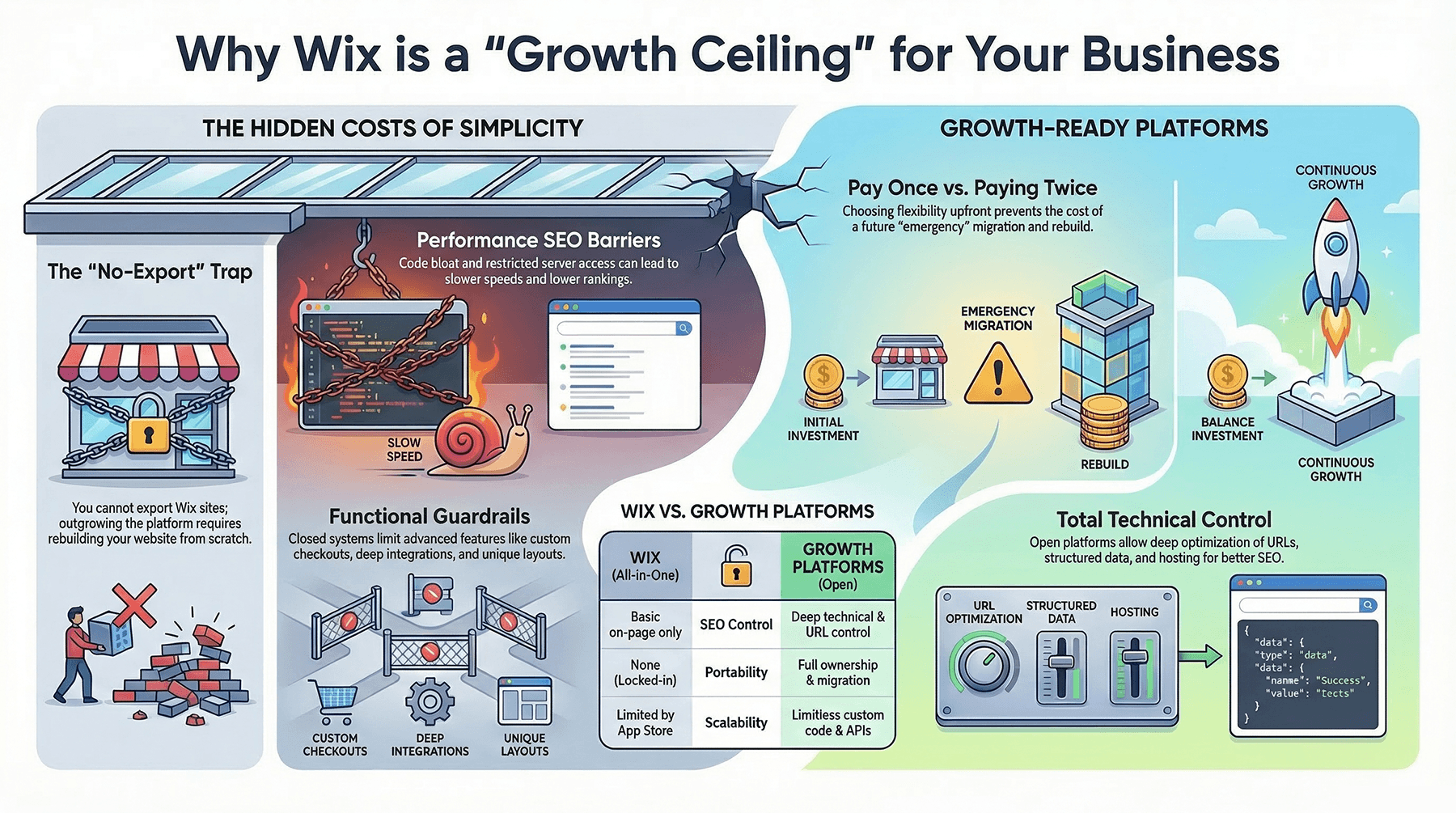
- Wix works for a basic brochure site. It's a poor fit for a business planning on years of growth.
- You're working inside templates, apps, and a closed system, which caps how far design, features, and user experience can go.
- Performance and technical SEO have a ceiling you can't raise, because you don't control the hosting stack, the code, or most of the technical configuration.
- There's no full site export. Outgrowing Wix means rebuilding, not migrating.
- Choosing a flexible platform up front avoids paying twice: once for the quick fix, again for the site you actually needed.
Most small and mid-sized businesses outgrow Wix faster than they expect, especially the ones that care about customization and long-term search performance.
Watch the companion video: The Wix trap for business websites
Simplicity has a price
Drag and drop sounds great when you need a website. It sounds less great two years in, when you want the site to generate leads, rank in Google, and support a business that has changed shape.
For a personal project or a temporary brochure site, Wix is a reasonable call. For a company competing in search, controlling its brand, and hoping to avoid a rebuild, it's usually the wrong foundation.
Customization stops where Wix stops
Wix markets design freedom. In practice you get the freedom their template system and closed platform allow.
Design and layout
The visual editor makes it easy to move boxes around and harder to build a clean, scalable structure underneath.
You're working within prebuilt templates and sections, so genuinely custom layouts tend to require workarounds. Complex behavior like membership logic, conditional content, or dynamic layouts is either unsupported or handled by awkward add-ons. Mobile layouts often need manual adjustment because elements don't always scale on their own, which means time spent fighting the editor instead of improving the experience.
Functionality
Past a basic brochure site, the limits show up quickly.
Advanced ecommerce scenarios such as complex product variations, custom checkout logic, or multi-currency selling are restricted or unsupported. Many Wix apps are shallow bolt-ons rather than deep integrations, and the ecosystem is considerably smaller than the WordPress plugin catalog or what you'd get from custom development. Developers can't reach the full source, so custom logic, integrations, and performance tuning are all constrained.
A concrete case: a restaurant wanting VIP-only menus, dynamic holiday specials, and custom reservation rules will hit the guardrails well before an equivalent WordPress build does.
Portability
This is the part most owners discover too late. Wix has no full site export. You can get your blog content out, but your design, page structure, and layouts stay behind.
When you outgrow the platform, and most growing businesses do, you rebuild rather than migrate. That means paying twice: once for the fast starter site, once for the site you needed.
For a business with plans, being locked to a platform that can't stretch is a standing drag on marketing and development work.
Where it holds back SEO
Wix's SEO tooling has improved. There's still a gap between adequate for a small site and competitive in a contested market.
Performance you can't fix
Speed affects rankings and conversion. Wix pages tend to be JavaScript-heavy, and the platform serves them from a stack you don't control.
Wix has added caching, WebP images, and lazy loading, which helps. What you can't do is swap hosting, change CDNs, strip render-blocking scripts, or rework the code that's slowing the page. On an open platform those are all normal optimization moves. On Wix they aren't available.
For local SEO that gap compounds. Competitors on lighter, faster sites gain a little in rankings and considerably more in how people actually behave on the page.
Technical SEO ceilings
You can edit the basics on Wix: title tags, meta descriptions, alt text. Deeper work is where it falls behind.
URL structures are less flexible, without the granular permalink control you'd have on WordPress or a custom build. Robots.txt handling, advanced redirects, and fully custom structured data are limited, partially automated, or locked behind presets with their own character and implementation constraints. Database-driven dynamic pages don't always pair cleanly with metadata and schema, which caps how rich your search listings can get.
Basic SEO on Wix is fine. The ceiling arrives once you're chasing higher-value keywords or need advanced technical work to hold position.
Content constraints
Content drives most long-term SEO, and this is another place Wix chooses simplicity over capability.
The blog editor offers simpler formatting and fewer layout options than modern block editors. Features that experienced content teams use, including private posts, granular publishing controls, and flexible archives, are weaker or absent. And many attractive Wix designs lean on image-based content with text baked into graphics, which search engines can't read.
A content platform tuned for fast setup makes it harder to build the depth and structure that wins in search.
What this costs a real business
The trade-offs show up in leads, revenue, and daily friction, not just technical checklists.
Weaker differentiation
In a crowded local market, looking like everyone else is a problem.
Template-driven design and limited layout control make it harder to express a distinct brand, particularly against competitors investing in custom design. As services, locations, or audience segments multiply, forcing them into a rigid structure produces confusing navigation and thin, near-duplicate pages. Both hurt SEO on top of hurting the experience.
When the platform resists every attempt to improve clarity, you end up settling for "good enough" and calling it finished.
The cost of cheap and easy
Owners pick Wix because it looks affordable and fast. The bill arrives later.
Storage, bandwidth, and advanced features push you into higher-tier plans, which erodes the cost advantage as the site grows. Moving off means rebuilding design, content layouts, and technical structure from scratch. And SEO equity built on poorly structured pages doesn't always transfer cleanly, so you spend the rebuild fixing foundational issues you could have avoided.
Choosing a platform built for growth costs more strategy up front and less money over five years.
Wix compared with an open platform
WordPress is the usual point of comparison, so here's how the two differ across the areas that matter.
Design flexibility
Wix gives you a visual editor bounded by templates, with manual mobile adjustments a regular chore. WordPress supports flexible theming and page builders, and most layouts are achievable without touching code.
Custom functionality
Wix limits you to its own apps and partial customization, with no full code access. WordPress has a large plugin ecosystem, API access, and room for custom code and integrations when the situation calls for it.
SEO control
Wix covers on-page basics with limited URL control and constrained advanced options. WordPress gives you deep control over URLs, structured data, performance, and technical configuration.
Performance tuning
Wix runs on a closed stack with code-heavy pages and no ability to change hosting or CDN. WordPress lets you pick your host, caching layer, CDN, and optimization tooling.
Content and blogging
Wix's editor is simpler with fewer advanced features. WordPress is a full content management system, which matters for large or nuanced content programs.
Portability
Wix offers no practical full export, so leaving means rebuilding. WordPress content can be exported and migrated, and you own the stack and the data.
The point isn't feature count. It's not having to rebuild every time your goals get more ambitious.
When Wix is fine, and when it isn't
Wix isn't a bad product. It's misaligned with what a lot of growing businesses need.
It can work when
Your site is a small brochure in a low-competition market. Or it's temporary, a proof of concept where long-term SEO genuinely doesn't matter. Or you're validating an idea and are comfortable rebuilding once it works.
In those cases, fast setup can outweigh the limits for a while.
Look elsewhere when
Organic search is a primary lead source now or will be soon. You need advanced functionality, integrations, or custom user flows to deliver your services. Or you want a platform you can keep for five to ten years instead of rebuilding at every step up.
If being found, trusted, and chosen online matters to your business, the site's foundation is the wrong place to economize.
FAQs
Why is Wix often a poor long-term choice for business SEO?
It restricts technical SEO, URL control, and performance tuning, which makes advanced optimization harder as your market gets more competitive. Basic on-page SEO works fine; the ceiling shows up when you need more.
What hidden costs come with building a business website on Wix?
Beyond the plan fee, expect add-on app costs, transaction fees, higher-tier plans as storage and bandwidth needs grow, and eventual migration costs when you outgrow the platform.
Is Wix ever good enough for SEO?
For very small or early-stage sites in low-competition markets, yes. Businesses that depend on search for leads usually need deeper technical and content control than the platform provides.
Can I export my site from Wix?
Not in full. You can extract blog content, but the design, page structure, and layouts stay on Wix, which makes leaving a rebuild rather than a migration.
When should I consider moving off Wix?
When rankings stall despite doing the on-page work, when you need custom functionality or schema the platform won't support, or when your developer keeps hitting limits they cannot work around.
How does Wix compare with WordPress for a growing business?
WordPress offers deeper control over URLs, structured data, hosting, caching, and CDNs, plus a much larger plugin ecosystem and real content portability. Wix trades that control for faster initial setup.


