

TL;DR: For most businesses, yes. Courts and regulators have increasingly treated business websites as part of the customer experience covered by equal access requirements, and small local businesses get named in complaints regularly. The working standard is WCAG 2.1 or 2.2 Level AA: keyboard navigation, readable contrast, alt text, labeled forms, clear heading structure, captions. Overlay widgets don't fix any of that. Start with the pages that drive contact and revenue.
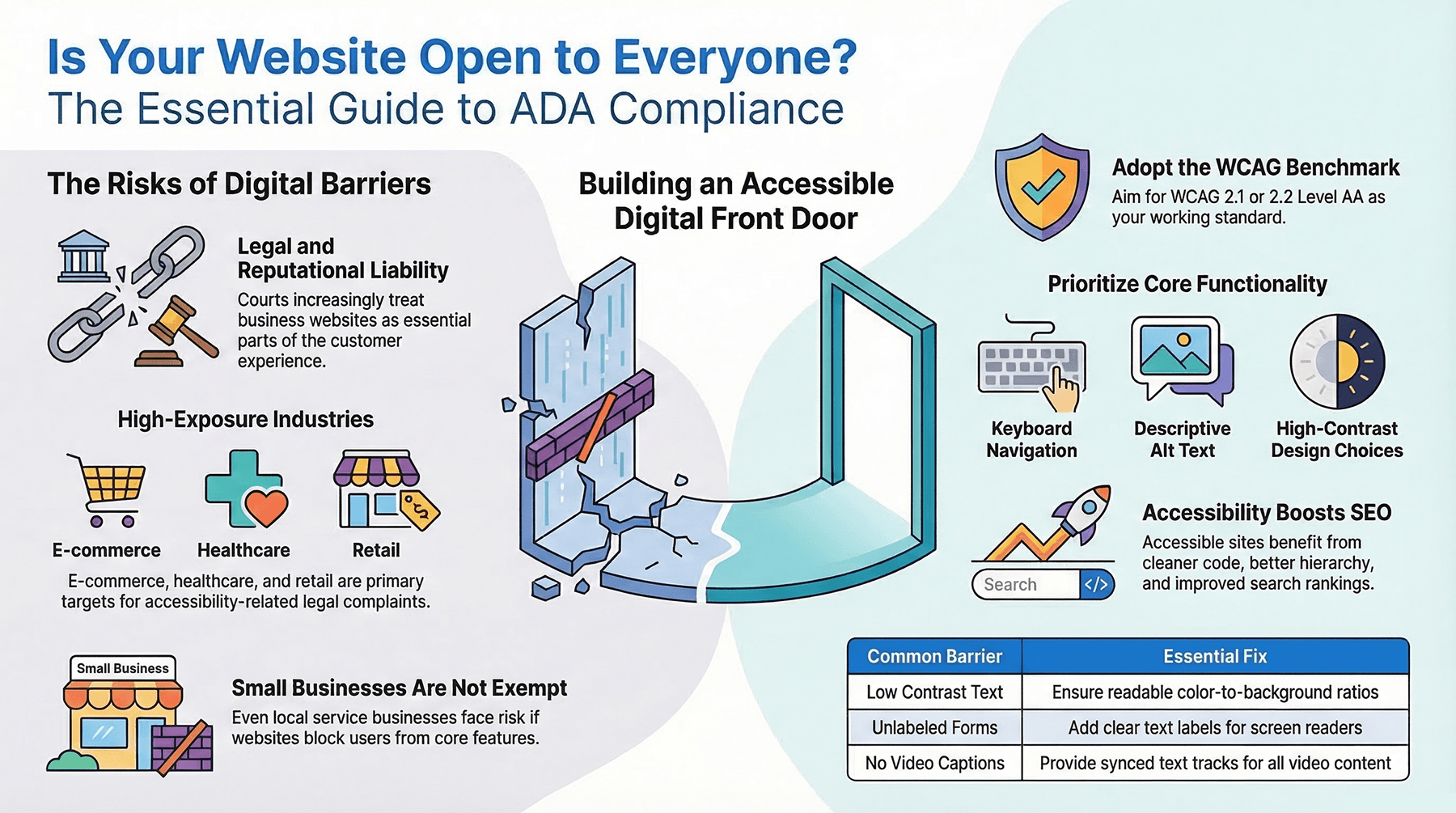
Key takeaways:
- Small businesses are not exempt. The idea that this only applies to large corporations and government sites is the most expensive misconception in the room.
- WCAG 2.1 or 2.2 Level AA is the practical benchmark, since the ADA itself doesn't publish a website checklist.
- Accessibility overlays and quick-fix plugins can't repair bad code structure, missing labels, or unusable navigation.
- Your platform doesn't protect you. Any builder or template can host inaccessible content, forms, and third-party tools.
- Accessibility and SEO share the same quality signals, so the fixes often help both.
- Accessible sites convert better for everyone. Better contrast, clearer navigation, and labeled forms reduce drop-off.
- This belongs in your maintenance plan. Every redesign, plugin update, new page, and uploaded PDF can break it.
- Start with your highest-revenue pages if a full audit feels like too much.
A customer lands on your site, tries to book an appointment, and gives up because the buttons don't respond to a keyboard or the text is unreadable with a screen reader. That's a lost lead, and it can also become a legal and reputational problem.
The legal details vary. The practical answer is clearer than most owners expect.
Small businesses are not exempt
Plenty of owners assume ADA rules apply only to major corporations or government sites. That's where the confusion starts.
The Americans with Disabilities Act was written before websites became central to how businesses operate, so the law doesn't spell out web rules in plain language. Courts, attorneys, and regulators have increasingly treated business websites as part of the customer experience anyway. If your site helps people shop, book, apply, learn, or contact your team, accessibility is part of providing equal access.
A local service business carries real risk when its site blocks people with disabilities from core features. A restaurant with an inaccessible menu, a medical practice with unusable intake forms, a retailer with checkout barriers: all of those create genuine problems for genuine users.
For a small business the sharper question is whether you can afford to ignore it.
What the ADA means in practice for a website
The ADA doesn't hand you a checklist that says pass these twenty items and you're done. Most organizations use the Web Content Accessibility Guidelines, WCAG, as the benchmark.
WCAG covers color contrast, keyboard navigation, alt text, form labels, video captions, heading structure, and compatibility with assistive technology. These aren't cosmetic. They decide whether someone can use your site at all.
Owners sometimes picture a one-time badge or certificate. Accessibility doesn't work that way. It's an ongoing standard, and every redesign, plugin update, product page, PDF upload, and new feature either improves it or breaks it.
Who carries the most risk
Exposure isn't equal. Healthcare, hospitality, legal services, education, retail, financial services, and local home services all tend to run important customer actions through their sites. The more your website works as a digital front door, the higher the risk.
E-commerce sites are especially exposed, since customers have to browse, compare, add items, and check out on their own. Service businesses aren't off the hook. If people request quotes, schedule appointments, submit forms, or research your services on your site, accessibility applies there too.
A very small company with a simple brochure site has less exposure than a multi-location retailer. Less exposure isn't none. Small businesses are still named in accessibility complaints and demand letters.
The business case is bigger than the legal one
Legal risk gets attention because the consequences are obvious. Accessibility also affects leads, trust, SEO, and brand credibility.
A site that works well for people using assistive technology usually works better for everyone. Clear headings help people scan. Strong contrast holds up on a phone in direct sunlight. Labeled forms cut drop-off. Captions help in a quiet office and a noisy waiting room.
Search engines benefit from the same structure. Accessible sites tend to have cleaner code, better content hierarchy, and meaningful image descriptions. Accessibility won't guarantee rankings, but it supports the same quality signals that improve visibility.
For a local business competing online, that's the point. You're removing friction that costs traffic and conversions.
What actually counts as compliant
There's no government-issued certificate that permanently proves compliance. What matters is conformance to a recognized standard and real usability for people with disabilities.
Most businesses target WCAG 2.1 Level AA or the newer 2.2 Level AA. In practice that means keyboard-only navigation works, non-text content has text alternatives, contrast is readable, forms are clearly labeled, and no design pattern traps or confuses users.
Testing matters too. A site can look polished and still fail basic checks. Automated tools catch the obvious problems, but they don't replace manual review. A page can load fine and still be impossible to use with a screen reader.
That's why accessibility belongs inside professional website design and maintenance rather than patched on afterward.
Watch the companion video: Do you need ADA compliance online?
The mistakes that show up over and over
Most accessibility problems are small decisions that stack up.
A designer picks light gray text on white because it looks clean. A developer builds a menu that only opens on hover. A contact form ships without labels. Someone uploads a PDF menu instead of building a readable page. Images carry key information with no alt text. Video goes up without captions.
Individually, none of these look serious. Together they can make a site partly or completely unusable for some visitors.
This is also why overlays and quick-fix widgets fall short. A business installs an accessibility plugin and assumes the problem is handled. It usually isn't. Those tools help in limited ways, and they don't repair poor code structure, missing labels, inaccessible forms, or weak content hierarchy.
Deciding what to do next
If your site is outdated, has never been reviewed, or was built without accessibility in mind, don't wait for a complaint.
Start with your most important customer paths. Can someone navigate your homepage, service pages, forms, booking tools, and checkout using only a keyboard? Do images have useful alt text? Are headings organized properly? Is the text readable? Are videos captioned? If you don't know, that's your answer about whether to assess the site.
For some businesses a handful of targeted fixes removes the biggest barriers. For older sites, a rebuild is often the smarter investment. It feels like a bigger step, and it usually delivers more than accessibility: better mobile usability, stronger conversion flow, faster pages, and improved search performance.
Website builders don't transfer the responsibility
Builders and templates can make accessibility easier when they ship with good structure. They don't guarantee anything. You can still add inaccessible images, weak contrast, confusing navigation, unlabeled forms, and broken content patterns on any platform.
Third-party tools deserve the same scrutiny. Online schedulers, chat widgets, pop-ups, and embedded forms can create barriers even when the site around them is fine. If customers use those tools to reach you, review them.
The practical view
Owners ask this question hoping for a clean yes or no. Legally there's still gray area depending on business type and jurisdiction. Operationally there's much less.
If your website helps customers do business with you, accessibility belongs in the build, the content plan, and the maintenance schedule. That reduces avoidable risk, and it supports the outcome you actually care about: more people finding you, trusting you, and taking action.
Not sure where your site stands? Start with the pages that matter most to revenue and customer contact. Fixing access there makes an immediate difference and usually leads to a better website overall.
FAQs
Do I need ADA compliance for my website if I run a small business?
For most small businesses, yes. Courts and regulators have increasingly treated business websites as part of the customer experience subject to ADA requirements, and small businesses are regularly named in accessibility complaints.
What is WCAG and how does it relate to ADA compliance?
WCAG is the Web Content Accessibility Guidelines. Because the ADA doesn't publish a technical checklist for websites, most organizations use WCAG 2.1 or 2.2 Level AA as the working standard, covering keyboard navigation, contrast, alt text, form labels, headings, and captions.
Which businesses face the highest website accessibility risk?
Healthcare, hospitality, legal services, education, retail, financial services, and local home services carry elevated risk because their sites handle important customer actions. E-commerce is especially exposed since customers have to complete transactions independently.
Does using a website builder make my site ADA compliant?
No. The platform doesn't remove your responsibility. Inaccessible images, weak contrast, unlabeled forms, and third-party tools like schedulers and chat widgets can create barriers on any builder.
Are accessibility overlays and plugins enough?
No. Overlays are marketed as compliance solutions, but they don't repair the underlying problems: poor code structure, missing labels, inaccessible forms, and weak content hierarchy.
Does accessibility affect SEO?
They share many of the same quality signals. Clean code, proper heading hierarchy, meaningful alt text, and well-structured content help assistive technology and search crawlers alike, so accessibility work often produces SEO gains too.


